Motivation
Data augmentation is used in machine learning to expand the number of examples in a dataset. For images, it is common to use image processing techniques like flipping, rotation, additive noise, alpha blending, and many others to slightly modify an image and add the edited image to the dataset.
Problem description
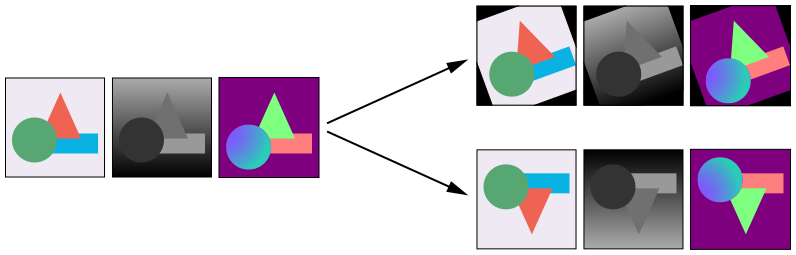
Your task is to design a basic library to perform data augmentations for paired image-to-image translation.
Datasets for paired image-to-image translation consists of images from a source domain A and images from some target domain(s) Bi (i ≥ 1).
This means that the dataset consists of a set of N input images from domain A and some number of other sets Bi that contain N corresponding images in other modalities.
For example, let’s say you are training an image-to-image GAN which takes images of line drawings as input and generates images of watercolor paintings and oil paintings.
Requirements
Your solution should:
- be written in Python
- use a common image processing library like OpenCV (Python), Pillow, scikit-image
- use appropriate and efficient data structures
- be designed as a stand-alone command-line application
- support running on 1 or more sets of images (where all sets have the same filenames but are contained in different directories)
- use a random number generator for each of the manipulations
- support at least 2 different image manipulations (we gave links above to flipping and rotating)
Data
You can download some sample data here.
It contains rgb images (which you may think about as set A above), as well as depth and normal images (which you may think about as sets B1 and B2 above). This is a made-up dataset of a synthetic 3D scenes. Your script need-not care about the data types.
It contains the following files:
data
├── rgb
│   ├── 0000.png
│   ├── 0001.png
│   ├── 0002.png
│   ├── 0003.png
│   ├── 0004.png
│   ├── 0005.png
│   ├── 0006.png
│   ├── 0007.png
│   ├── 0008.png
│   └── 0009.png
├── normal
│   ├── 0000.png
│   ├── 0001.png
│   ├── 0002.png
│   ├── 0003.png
│   ├── 0004.png
│   ├── 0005.png
│   ├── 0006.png
│   ├── 0007.png
│   ├── 0008.png
│   └── 0009.png
└── depth
    ├── 0000.png
    ├── 0001.png
    ├── 0002.png
    ├── 0003.png
    ├── 0004.png
    ├── 0005.png
    ├── 0006.png
    ├── 0007.png
    ├── 0008.png
    └── 0009.png
Example
For example, your application could be run like this:
python3 augment.py data/rgb data/normal data/depth --output augmentations_output --count 10
Which would create 10 different augmentations of each of the three directories of images.
In each of these 10 augmentations some (random) amount of rotation and scaling (for example) will be applied to the image-sets and the results will be saved in sub-directories of augmentations_output.
For example, here’s an abbreviated file list that may result:
augmentations_output
├── rgb-00
│   ├── 0000.png
│   ├── ...
│   └── 0009.png
├── ...
├── rgb-09
│   ├── 0000.png
│   ├── ...
│   └── 0009.png
├── normal-00
│   ├── 0000.png
│   ├── ...
│   └── 0009.png
├── ...
├── normal-09
│   ├── 0000.png
│   ├── ...
│   └── 0009.png
├── depth-00
│   ├── 0000.png
│   ├── ...
│   └── 0009.png
├── ...
└── depth-09
    ├── 0000.png
    ├── ...
    └── 0009.png
Remember that, for exmaple, rgb-01/0004.png and normal-01/0004.png and depth-01/0004.png will all have had the same modifications applied to them (as shown in the figure at the top).
If you have any questions, please let us know.